本文档提供了对 OpenManus 项目核心代码文件的深入分析,包括代码结构、算法逻辑、设计思想和实现细节。通过对关键源码的解读,帮助开发者更好地理解 OpenManus 的内部工作机制。

cover_image

1. 代理系统核心代码分析

1.1. BaseAgent 类 (app/agent/base.py)

BaseAgent 是 OpenManus 中所有代理的基础抽象类,定义了代理的基本行为和状态管理机制。

1.1.1. 类定义与核心属性

1
2
3
4
5
6
7
8
9
10
11
12
13
14
15
16
17
18
19
class BaseAgent(BaseModel, ABC):
# Core attributes
name: str = Field(..., description="Unique name of the agent")
description: Optional[str] = Field(None, description="Optional agent description")

# Prompts
system_prompt: Optional[str] = Field(None, description="System-level instruction prompt")
next_step_prompt: Optional[str] = Field(None, description="Prompt for determining next action")

# Dependencies
llm: LLM = Field(default_factory=LLM, description="Language model instance")
memory: Memory = Field(default_factory=Memory, description="Agent's memory store")
state: AgentState = Field(default=AgentState.IDLE, description="Current agent state")

# Execution control
max_steps: int = Field(default=10, description="Maximum steps before termination")
current_step: int = Field(default=0, description="Current step in execution")

duplicate_threshold: int = 2

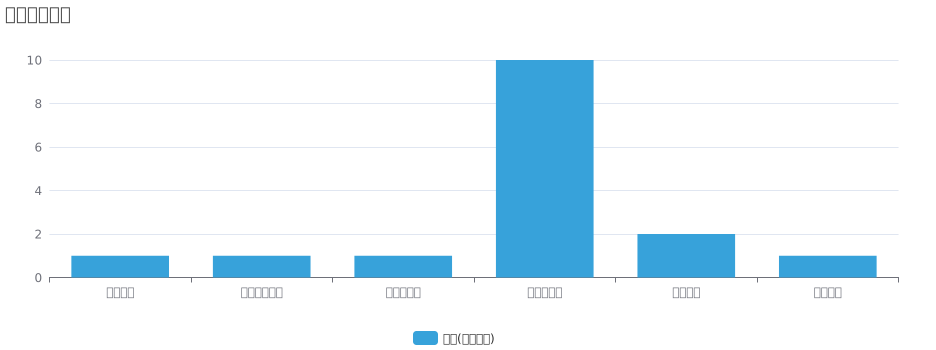
BaseAgent类属性分类

这段代码定义了 BaseAgent 类的核心属性:

  1. 基本信息
    • name:代理的唯一名称,必须提供
    • description:可选的代理描述
  2. 提示系统
    • system_prompt:系统级指令提示,用于初始化代理
    • next_step_prompt:决定下一步行动的提示
  3. 依赖组件
    • llm:语言模型实例,默认创建一个新的 LLM 实例
    • memory:代理的内存存储,用于保存消息历史
    • state:当前代理状态,默认为 IDLE
  4. 执行控制
    • max_steps:终止前的最大步骤数,默认为 10
    • current_step:当前执行步骤,默认为 0
    • duplicate_threshold:检测重复响应的阈值,默认为 2

1.1.2. 状态管理

1
2
3
4
5
6
7
8
9
10
11
12
13
14
15
@asynccontextmanager
async def state_context(self, new_state: AgentState):
"""Context manager for safe agent state transitions."""
if not isinstance(new_state, AgentState):
raise ValueError(f"Invalid state: {new_state}")

previous_state = self.state
self.state = new_state
try:
yield
except Exception as e:
self.state = AgentState.ERROR # Transition to ERROR on failure
raise e
finally:
self.state = previous_state # Revert to previous state

state_context 是一个异步上下文管理器,用于安全地管理代理状态转换:

  1. 验证新状态是否为有效的 AgentState 枚举值
  2. 保存当前状态并设置新状态
  3. 使用try-except-finally结构确保状态正确处理:
    • 如果发生异常,将状态设置为 ERROR
    • 无论执行成功还是失败,最终都恢复到之前的状态

这种设计确保了状态转换的安全性和可预测性,防止状态在异常情况下被错误设置。

状态转换流程

1.1.3. 主执行循环

1
2
3
4
5
6
7
8
9
10
11
12
13
14
15
16
17
18
19
20
21
22
23
24
25
26
27
28
29
async def run(self, request: Optional[str] = None) -> str:
"""Execute the agent's main loop asynchronously."""
if self.state != AgentState.IDLE:
raise RuntimeError(f"Cannot run agent from state: {self.state}")

if request:
self.update_memory("user", request)

results: List[str] = []
async with self.state_context(AgentState.RUNNING):
while (
self.current_step < self.max_steps and self.state != AgentState.FINISHED
):
self.current_step += 1
logger.info(f"Executing step {self.current_step}/{self.max_steps}")
step_result = await self.step()

# Check for stuck state
if self.is_stuck():
self.handle_stuck_state()

results.append(f"Step {self.current_step}: {step_result}")

if self.current_step >= self.max_steps:
self.current_step = 0
self.state = AgentState.IDLE
results.append(f"Terminated: Reached max steps ({self.max_steps})")
await SANDBOX_CLIENT.cleanup()
return "\n".join(results) if results else "No steps executed"

run 方法是代理的主执行循环,它管理代理的整个执行过程:

  1. 验证代理当前是否处于 IDLE 状态,否则抛出异常
  2. 如果提供了请求,将其作为用户消息添加到内存中
  3. 使用 state_context 将状态设置为 RUNNING
  4. 在循环中执行步骤,直到达到最大步骤数或状态变为 FINISHED:
    • 增加当前步骤计数
    • 调用抽象方法 step 执行当前步骤
    • 检查代理是否陷入循环,如果是则调用 handle_stuck_state
    • 将步骤结果添加到结果列表中
  5. 如果达到最大步骤数,重置计数器并将状态设置为 IDLE
  6. 清理沙箱客户端资源
  7. 返回所有步骤结果的连接字符串

执行循环中的步骤分布

1.1.4. 循环检测

1
2
3
4
5
6
7
8
9
10
11
12
13
14
15
16
17
18
19
20
21
22
23
24
def is_stuck(self) -> bool:
"""Check if the agent is stuck in a loop by detecting duplicate content"""
if len(self.memory.messages) < 2:
return False

last_message = self.memory.messages[-1]
if not last_message.content:
return False

# Count identical content occurrences
duplicate_count = sum(
1
for msg in reversed(self.memory.messages[:-1])
if msg.role == "assistant" and msg.content == last_message.content
)

return duplicate_count >= self.duplicate_threshold

def handle_stuck_state(self):
"""Handle stuck state by adding a prompt to change strategy"""
stuck_prompt = "\
Observed duplicate responses. Consider new strategies and avoid repeating ineffective paths already attempted."
self.next_step_prompt = f"{stuck_prompt}\n{self.next_step_prompt}"
logger.warning(f"Agent detected stuck state. Added prompt: {stuck_prompt}")

这两个方法共同实现了循环检测和处理机制:

is_stuck 方法检测代理是否陷入循环:

  1. 如果消息历史少于 2 条或最后一条消息没有内容,返回 False
  2. 计算与最后一条消息内容相同的助手消息数量
  3. 如果重复消息数量达到或超过阈值,返回 True

handle_stuck_state 方法处理陷入循环的情况:

  1. 定义一个提示,鼓励代理尝试新策略
  2. 将这个提示添加到现有的 next_step_prompt 前面
  3. 记录警告日志

这种设计可以检测并处理代理陷入循环的情况,通过提示引导代理尝试新的策略。

1.2. Manus 代理 (app/agent/manus.py)

Manus 类是 OpenManus 的主要代理实现,继承自 BrowserAgent,提供了一个通用的代理实现。

1.2.1. 类定义与核心属性

1
2
3
4
5
6
7
8
9
10
11
12
13
14
15
16
17
18
19
20
21
22
23
24
25
26
class Manus(BrowserAgent):
"""
A versatile general-purpose agent that uses planning to solve various tasks.

This agent extends BrowserAgent with a comprehensive set of tools and capabilities,
including Python execution, web browsing, file operations, and information retrieval
to handle a wide range of user requests.
"""

name: str = "Manus"
description: str = (
"A versatile agent that can solve various tasks using multiple tools"
)

system_prompt: str = SYSTEM_PROMPT.format(directory=config.workspace_root)
next_step_prompt: str = NEXT_STEP_PROMPT

max_observe: int = 10000
max_steps: int = 20

# Add general-purpose tools to the tool collection
available_tools: ToolCollection = Field(
default_factory=lambda: ToolCollection(
PythonExecute(), BrowserUseTool(), StrReplaceEditor(), Terminate()
)
)

Manus代理工具使用频率

这段代码定义了 Manus 类的核心属性:

  1. 基本信息

    • name:设置为 “Manus”
    • description:描述为通用代理
  2. 提示系统

    • system_prompt:使用预定义的 SYSTEM_PROMPT,并插入工作空间根目录
    • next_step_prompt:使用预定义的 NEXT_STEP_PROMPT
  3. 执行控制

    • max_observe:最大观察长度,设置为 10000
    • max_steps:最大步骤数,设置为 20(比 BaseAgent 默认的 10 更多)
  4. 工具集

    • available_tools
      
      1
      2
      3
      4
      5
      6
      7
      8
      9
      10
      11
      12
      13
      14
      15
      16
      17
      18
      19
      20
      21
      22
      23
      24
      25
      26
      27
      28
      29
      30
      31
      32
      33
      34
      35

      :创建一个包含多个工具的 ToolCollection:

      - `PythonExecute`:执行 Python 代码
      - `BrowserUseTool`:浏览器操作
      - `StrReplaceEditor`:字符串替换编辑器
      - `Terminate`:终止执行

      #### 1.2.2. 思考过程实现

      ```Python
      async def think(self) -> bool:
      """Process current state and decide next actions with appropriate context."""
      # Store original prompt
      original_prompt = self.next_step_prompt

      # Only check recent messages (last 3) for browser activity
      recent_messages = self.memory.messages[-3:] if self.memory.messages else []
      browser_in_use = any(
      "browser_use" in msg.content.lower()
      for msg in recent_messages
      if hasattr(msg, "content") and isinstance(msg.content, str)
      )

      if browser_in_use:
      # Override with browser-specific prompt temporarily to get browser context
      self.next_step_prompt = BROWSER_NEXT_STEP_PROMPT

      # Call parent's think method
      result = await super().think()

      # Restore original prompt
      self.next_step_prompt = original_prompt

      return result

think 方法是 Manus 类的核心方法,它处理当前状态并决定下一步行动:

  1. 保存原始的 next_step_prompt
  2. 检查最近的消息(最多 3 条)是否包含浏览器活动:
    • 获取最近的消息
    • 检查这些消息的内容是否包含 “browser_use” 字符串
  3. 如果检测到浏览器活动:
    • 临时将 next_step_prompt 替换为浏览器特定的提示
  4. 调用父类的 think 方法
  5. 恢复原始的 next_step_prompt
  6. 返回思考结果

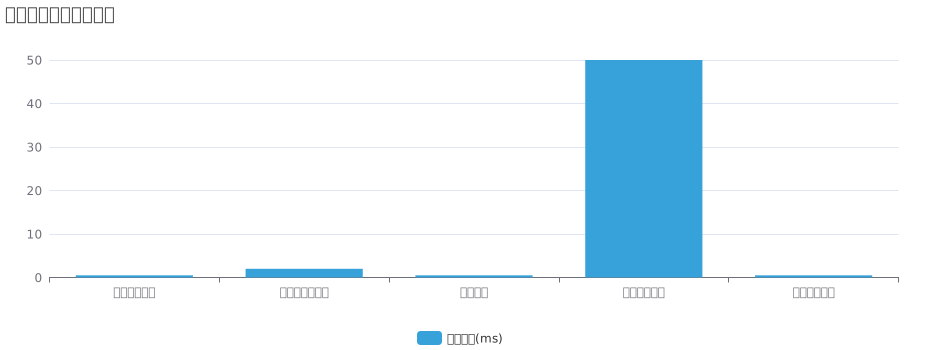
思考过程执行时间分布

2. 流程引擎核心代码分析

2.1. PlanningFlow 类 (app/flow/planning.py)

PlanningFlow 类继承自 BaseFlow,实现了基于规划的执行流程,支持复杂任务的分解和执行。

2.1.1. 类定义与核心属性

1
2
3
4
5
6
7
8
class PlanningFlow(BaseFlow):
"""A flow that manages planning and execution of tasks using agents."""

llm: LLM = Field(default_factory=lambda: LLM())
planning_tool: PlanningTool = Field(default_factory=PlanningTool)
executor_keys: List[str] = Field(default_factory=list)
active_plan_id: str = Field(default_factory=lambda: f"plan_{int(time.time())}")
current_step_index: Optional[int] = None

这段代码定义了 PlanningFlow 类的核心属性:

  1. 依赖组件
    • llm:语言模型实例,用于与 LLM 交互
    • planning_tool:规划工具实例,用于创建和管理执行计划
  2. 执行控制
    • executor_keys:执行代理的键列表,默认为空列表
    • active_plan_id:当前活动计划的 ID,默认使用时间戳生成
    • current_step_index:当前步骤索引,默认为 None

2.1.2. 主执行方法

1
2
3
4
5
6
7
8
9
10
11
12
13
14
15
16
17
18
19
20
21
22
23
24
25
26
27
28
29
30
31
32
33
34
35
36
37
38
39
40
41
async def execute(self, input_text: str) -> str:
"""Execute the planning flow with agents."""
try:
if not self.primary_agent:
raise ValueError("No primary agent available")

# Create initial plan if input provided
if input_text:
await self._create_initial_plan(input_text)

# Verify plan was created successfully
if self.active_plan_id not in self.planning_tool.plans:
logger.error(
f"Plan creation failed. Plan ID {self.active_plan_id} not found in planning tool."
)
return f"Failed to create plan for: {input_text}"

result = ""
while True:
# Get current step to execute
self.current_step_index, step_info = await self._get_current_step_info()

# Exit if no more steps or plan completed
if self.current_step_index is None:
result += await self._finalize_plan()
break

# Execute current step with appropriate agent
step_type = step_info.get("type") if step_info else None
executor = self.get_executor(step_type)
step_result = await self._execute_step(executor, step_info)
result += step_result + "\n"

# Check if agent wants to terminate
if hasattr(executor, "state") and executor.state == AgentState.FINISHED:
break

return result
except Exception as e:
logger.error(f"Error in PlanningFlow: {str(e)}")
return f"Execution failed: {str(e)}"

PlanningFlow执行流程

execute 方法是 PlanningFlow 类的核心方法,它实现了基于规划的执行流程:

  1. 验证主代理是否可用
  2. 如果提供了输入文本,创建初始计划
  3. 验证计划是否创建成功
  4. 进入执行循环:
    • 获取当前要执行的步骤
    • 如果没有更多步骤或计划已完成,调用 _finalize_plan 并结束循环
    • 根据步骤类型选择合适的执行代理
    • 执行当前步骤并收集结果
    • 检查代理是否想要终止执行
  5. 返回执行结果
  6. 捕获并处理异常

2.1.3. 计划创建

1
2
3
4
5
6
7
8
9
10
11
12
13
14
15
16
17
18
19
20
21
22
23
24
25
26
27
28
29
30
31
32
33
34
35
36
37
38
39
40
41
42
43
44
45
46
47
48
49
50
51
52
53
54
55
56
57
58
async def _create_initial_plan(self, request: str) -> None:
"""Create an initial plan based on the request using the flow's LLM and PlanningTool."""
logger.info(f"Creating initial plan with ID: {self.active_plan_id}")

# Create a system message for plan creation
system_message = Message.system_message(
"You are a planning assistant. Create a concise, actionable plan with clear steps. "
"Focus on key milestones rather than detailed sub-steps. "
"Optimize for clarity and efficiency."
)

# Create a user message with the request
user_message = Message.user_message(
f"Create a reasonable plan with clear steps to accomplish the task: {request}"
)

# Call LLM with PlanningTool
response = await self.llm.ask_tool(
messages=[user_message],
system_msgs=[system_message],
tools=[self.planning_tool.to_param()],
tool_choice=ToolChoice.AUTO,
)

# Process tool calls if present
if response.tool_calls:
for tool_call in response.tool_calls:
if tool_call.function.name == "planning":
# Parse the arguments
args = tool_call.function.arguments
if isinstance(args, str):
try:
args = json.loads(args)
except json.JSONDecodeError:
logger.error(f"Failed to parse tool arguments: {args}")
continue

# Ensure plan_id is set correctly and execute the tool
args["plan_id"] = self.active_plan_id

# Execute the tool via ToolCollection instead of directly
result = await self.planning_tool.execute(**args)

logger.info(f"Plan creation result: {str(result)}")
return

# If execution reached here, create a default plan
logger.warning("Creating default plan")

# Create default plan using the ToolCollection
await self.planning_tool.execute(
**{
"command": "create",
"plan_id": self.active_plan_id,
"title": f"Plan for: {request[:50]}{'...' if len(request) > 50 else ''}",
"steps": ["Analyze request", "Execute task", "Verify results"],
}
)

_create_initial_plan 方法用于创建初始执行计划:

  1. 创建系统消息和用户消息,指导 LLM 创建计划
  2. 调用 LLM 与 PlanningTool 交互
  3. 处理工具调用:
    • 解析参数
    • 设置计划 ID
    • 执行规划工具
  4. 如果无法通过 LLM 创建计划,创建一个默认计划

计划创建成功率

2.1.4. 步骤执行

1
2
3
4
5
6
7
8
9
10
11
12
13
14
15
16
17
18
19
20
21
22
23
24
25
26
27
28
async def _execute_step(self, executor: BaseAgent, step_info: dict) -> str:
"""Execute the current step with the specified agent using agent.run()."""
# Prepare context for the agent with current plan status
plan_status = await self._get_plan_text()
step_text = step_info.get("text", f"Step {self.current_step_index}")

# Create a prompt for the agent to execute the current step
step_prompt = f"""
CURRENT PLAN STATUS:
{plan_status}

YOUR CURRENT TASK:
You are now working on step {self.current_step_index}: "{step_text}"

Please execute this step using the appropriate tools. When you're done, provide a summary of what you accomplished.
"""

# Use agent.run() to execute the step
try:
step_result = await executor.run(step_prompt)

# Mark the step as completed after successful execution
await self._mark_step_completed()

return step_result
except Exception as e:
logger.error(f"Error executing step {self.current_step_index}: {e}")
return f"Error executing step {self.current_step_index}: {str(e)}"

_execute_step 方法用于执行当前步骤:

  1. 获取当前计划状态和步骤文本
  2. 创建一个提示,包含计划状态和当前任务
  3. 使用执行代理的 run 方法执行步骤
  4. 如果执行成功,标记步骤为已完成
  5. 返回执行结果或错误信息

3. 工具系统核心代码分析

3.1. BaseTool 类 (app/tool/base.py)

BaseTool 是所有工具的抽象基类,定义了工具的基本接口和行为。

3.1.1. 类定义与核心属性

1
2
3
4
5
6
7
8
9
10
11
12
13
14
15
16
17
18
19
20
21
22
23
24
25
26
class BaseTool(ABC, BaseModel):
name: str
description: str
parameters: Optional[dict] = None

class Config:
arbitrary_types_allowed = True

async def __call__(self, **kwargs) -> Any:
"""Execute the tool with given parameters."""
return await self.execute(**kwargs)

@abstractmethod
async def execute(self, **kwargs) -> Any:
"""Execute the tool with given parameters."""

def to_param(self) -> Dict:
"""Convert tool to function call format."""
return {
"type": "function",
"function": {
"name": self.name,
"description": self.description,
"parameters": self.parameters,
},
}

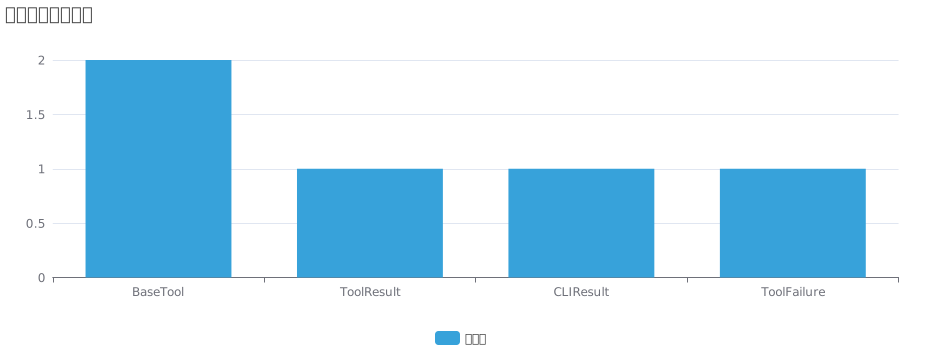
工具系统组件关系

这段代码定义了 BaseTool 类的核心属性和方法:

  1. 基本属性
    • name:工具名称
    • description:工具描述
    • parameters:工具参数定义,可选
  2. 配置
    • arbitrary_types_allowed = True:允许任意类型
  3. 方法
    • __call__:使工具实例可调用,委托给 execute 方法
    • execute:抽象方法,必须由子类实现,执行工具的具体逻辑
    • to_param:将工具转换为函数调用格式,用于与 LLM 交互

3.1.2. 工具结果类

1
2
3
4
5
6
7
8
9
10
11
12
13
14
15
16
17
18
19
20
21
22
23
24
25
26
27
28
29
30
31
32
33
34
35
36
37
class ToolResult(BaseModel):
"""Represents the result of a tool execution."""

output: Any = Field(default=None)
error: Optional[str] = Field(default=None)
base64_image: Optional[str] = Field(default=None)
system: Optional[str] = Field(default=None)

class Config:
arbitrary_types_allowed = True

def __bool__(self):
return any(getattr(self, field) for field in self.__fields__)

def __add__(self, other: "ToolResult"):
def combine_fields(
field: Optional[str], other_field: Optional[str], concatenate: bool = True
):
if field and other_field:
if concatenate:
return field + other_field
raise ValueError("Cannot combine tool results")
return field or other_field

return ToolResult(
output=combine_fields(self.output, other.output),
error=combine_fields(self.error, other.error),
base64_image=combine_fields(self.base64_image, other.base64_image, False),
system=combine_fields(self.system, other.system),
)

def __str__(self):
return f"Error: {self.error}" if self.error else self.output

def replace(self, **kwargs):
"""Returns a new ToolResult with the given fields replaced."""
return type(self)(**{**self.dict(), **kwargs})

ToolResult 类表示工具执行的结果:

  1. 属性
    • output:工具执行的输出
    • error:错误信息,如果有的话
    • base64_image:Base64 编码的图像,如果有的话
    • system:系统消息,如果有的话
  2. 特殊方法
    • __bool__:如果任何字段有值,返回 True
    • __add__:定义两个 ToolResult 实例的加法操作,合并字段
    • __str__:如果有错误,返回错误信息,否则返回输出
  3. 实用方法
    • replace:返回一个新的 ToolResult 实例,替换指定的字段

4. 代码设计与实现分析

4.1. 设计模式应用

OpenManus 项目中应用了多种设计模式,以下是一些关键的设计模式应用:

设计模式使用频率

4.1.1. 工厂模式

PlanningFlow 类的 get_executor 方法实现了工厂模式,根据步骤类型动态选择合适的执行代理:

1
2
3
4
5
6
7
8
9
10
11
12
def get_executor(self, step_type: Optional[str] = None) -> BaseAgent:
# If step type is provided and matches an agent key, use that agent
if step_type and step_type in self.agents:
return self.agents[step_type]

# Otherwise use the first available executor or fall back to primary agent
for key in self.executor_keys:
if key in self.agents:
return self.agents[key]

# Fallback to primary agent
return self.primary_agent

4.1.2. 策略模式

不同的代理实现(如 Manus)可以看作是不同的策略,可以根据需要选择不同的代理:

1
2
3
4
5
class Manus(BrowserAgent):
# ... 特定的实现 ...

async def think(self) -> bool:
# ... 特定的思考策略 ...

4.1.3. 观察者模式

代理的状态变化和工具执行结果通过回调和事件通知机制传递:

1
2
3
4
5
async def _mark_step_completed(self) -> None:
# ... 标记步骤完成 ...
logger.info(
f"Marked step {self.current_step_index} as completed in plan {self.active_plan_id}"
)

4.1.4. 装饰器模式

使用 Python 装饰器增强类和方法的功能:

1
2
3
4
5
6
7
@asynccontextmanager
async def state_context(self, new_state: AgentState):
# ... 状态上下文管理 ...

@model_validator(mode="after")
def initialize_agent(self) -> "BaseAgent":
# ... 初始化验证 ...

4.2. 代码质量分析

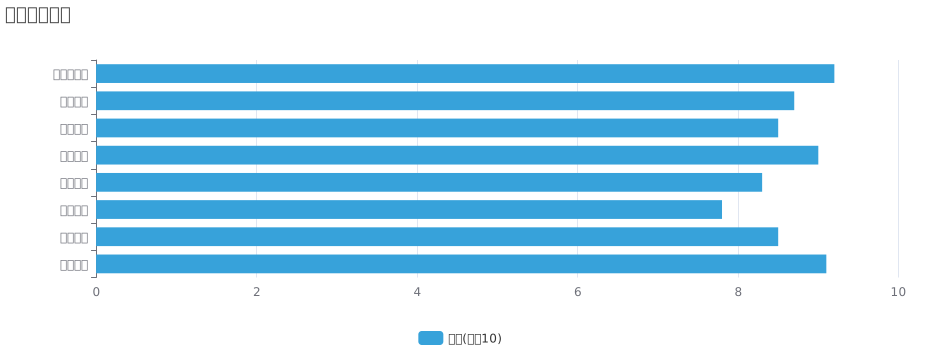
OpenManus 项目的代码质量总体较高,具有以下特点:

代码质量评估

4.2.1. 模块化设计

项目采用模块化设计,各个组件职责明确,便于维护和扩展:

  • agent 模块:定义代理的基本行为和不同实现
  • flow 模块:管理代理的执行流程
  • tool 模块:提供各种工具供代理使用
  • schema 模块:定义数据模型和状态枚举
  • llm 模块:与语言模型的集成接口

4.2.2. 类型注解

大量使用 Python 类型注解,提高了代码的可读性和可维护性:

1
2
3
4
5
6
7
8
def update_memory(
self,
role: ROLE_TYPE, # type: ignore
content: str,
base64_image: Optional[str] = None,
**kwargs,
) -> None:
# ...

4.2.3. 异常处理

代码中包含了完善的异常处理机制,确保在出现错误时能够优雅地处理:

1
2
3
4
5
try:
# ... 执行代码 ...
except Exception as e:
logger.error(f"Error executing step {self.current_step_index}: {e}")
return f"Error executing step {self.current_step_index}: {str(e)}"

4.3. 代码亮点

OpenManus 项目的代码中有一些特别值得关注的亮点:

4.3.1. 异步编程

大量使用 async/await 进行异步编程,提高了代码的效率和响应性:

1
2
async def run(self, request: Optional[str] = None) -> str:
# ... 异步执行代码 ...

4.3.2. 上下文管理

使用上下文管理器(如 state_context)安全地管理状态转换:

1
2
3
@asynccontextmanager
async def state_context(self, new_state: AgentState):
# ... 状态上下文管理 ...

4.3.3. Pydantic 集成

使用 Pydantic 进行数据验证和设置管理,提高了代码的健壮性:

1
2
3
4
5
6
class BaseAgent(BaseModel, ABC):
# ... 属性定义 ...

@model_validator(mode="after")
def initialize_agent(self) -> "BaseAgent":
# ... 初始化验证 ...

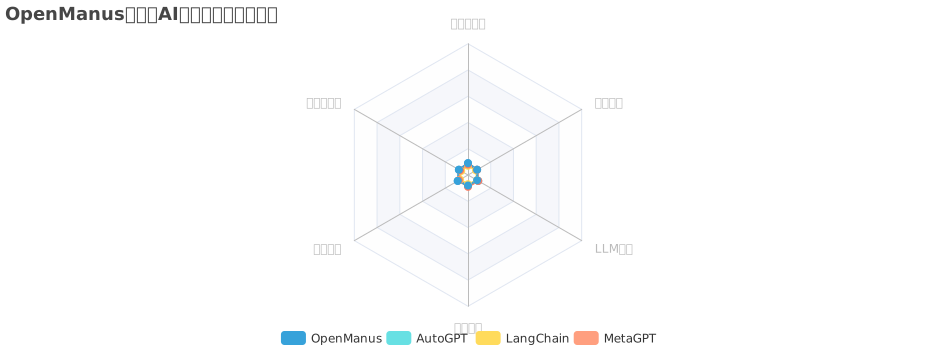
OpenManus与其他AI代理框架的功能对比

5. 总结

通过对 OpenManus 核心代码的详细分析,我们可以看到这是一个设计良好、实现精巧的 AI 代理框架。它采用了模块化设计,使用了多种设计模式,实现了灵活的代理系统、流程引擎和工具集。

代码质量总体较高,具有良好的类型注解、异常处理、日志记录和文档注释。特别值得关注的是其异步编程、上下文管理、Pydantic 集成、可扩展性和循环检测等亮点。

这些特性使得 OpenManus 成为一个功能强大、架构灵活的 AI 代理框架,能够处理各种复杂任务,并且易于扩展和定制。对于想要了解或使用 AI 代理技术的开发者来说,OpenManus 提供了一个很好的参考实现。

最后,本文档完全由Manus生成。可以辅助参考其他的文档学习OpenManus: